Places is a new feature in Firefox 3
Places -- bookmark tags
Location: http://www.mvps.org/dmcritchie/firefox/places.htm
Home page:
http://www.mvps.org/dmcritchie/firefox/firefox.htm
[View
without Frames]
Keep in mind that this page is trying to hit a moving target (Firefox 3).
If you like something in Firefox 3 it will probably be dropped, and if you
hate something in Firefox 3 it will probably stay that way for a long time.
Hopefully early warning will have keywords and folder shown once more
in all property context menus.
Description (#description)
Places Tags is similar to existing social bookmarking, where
you assign a mess of tags to a site and use them in searching
for bookmarks similar to how you use Google. Bookmarks
and tags are in an SQLITE database created from the bookmarks.html
file and if you're smart you recreate the bookmarks.html file each
time you close Firefox. Not a good idea, because
you will inevitably open a profile for use in Fx3 by a different version
because there are not makings on title bar of dialogs and Firefox (by default).
- History
- Downloads
- Keywords (index)
- Tags (index)
- All Bookmarks
- Bookmarks toolbar
- Bookmarks Menu
- Unfiled Bookmarks
| |
Some Google searches
- places location-bar ui search
Still more documentation needed:
- Laptop/desktop online/offline usage.
| |
Terminology (need real terms,
definitions and examples)
- keywords
- tags
- places
- Awesome Bar
- smart bookmarks
- saved search
- smart folders
- smart keywords
- smart tags
- filled star and unfilled star
| |
|
Internally bookmarks and history are the same.
Pages in history that are remembered until you delete them == bookmark
Pages in history that expire automatically (default 90 days) == history
Initial Impression (#impression)
My first impression, is the lack of documentation.
Though the concept seems clear enough.
In any case the suppression of keyword implementation
on Ctrl+D had been made usable with the "OpenBook"
extension in Firefox 2
without having to bring up properties afterwards. Now 'Keyword' has been
discombobulated once more with the fluffy 'Places' at the expense of the
really valuable 'Keyword' property, which is really hard to update, and the
recent list of where to place bookmark has been removed from create bookmark (Ctrl+D).
Things that need to be shown in properties and when creating a bookmark.
|
The properties of a Bookmark, whether for
existing bookmarks or for new bookmarks (Ctrl+D)
should always show:
- Name:
- Location:
- Keyword:
- Tags:
- Description
- Create in: (for bookmark folder,
or Located in: for existing bookmarks)
- [?] Show or Not Show in Sidebar
Optional detail display of generated data
in a smaller font:
Visit Date, Visit Count, Added, Last Modified
Visited: 2008-01-12 14:52 (14),
Added: 2008-01-12 09:14, Modified: 2008-01-11 10:45
| |
The properties of a
History item
should show:
- Name
- Location
- Visit Date,
- Visit Count,
|
Choosing columns to display through the View menu of
Places/bookmarks Organizer should remain sticky so that
they are there the next time/session as well. ♦
Firefox with all of it's improvements appears to be going downhill due
to a bad direction in documentation (documentation for the non-technical). Instead of clear / complete / concise
directions written by anyone in MozillaZine with careful scrutiny seems to going from better to worse starting
with a dysfunctional addons.mozilla.org in March, 2007. A support.mozilla.org
in progress from summer and ongoing whose mission is actually to make documentation
more readable but it looks like green puke over a comic book style, and now places in FF 3
which may be good but they are suppressing keyword so you really can't do much with either. ♦
And so it really isn't such a surprise that this page may greet some
people testing Firefox 3.0b2 (Beta 2), and I'm glad I started testing
without seeing that stupid destructive robot page initially. Welcome to Firefox 3 Beta 2. What in the world were they thinking, the more I see of Places it certainly look more and more like self-destruction.
Things that need to be improved by Mozilla and need for documentation at MozillaZine.
- Ctrl+D must include keyword and description as will as the tags that
was added, and must also include the folder that it is to be added to. Folder now included.
- Documentation of bookmark features, including
about:config items involved.
- Columns chosen in Bookmarks/History ("Places Organizer"),
need to be preserved for later sessions.
- Put the Home page button back to it's historic location, it certainly does not belong on my personal bookmarks which are folders.
- Minefield. Can't customize toolbars, will try to once more recreate localstore.rdf but think it is not the problem but toolbars code was changed so will try it once more.
(This problem just started with 3.0b4pre 2008020604, which was my second nightly build)
Things that seem actually good in Places
- JavaScript is now whitelisted instead of simply same setting for all sites.
What happened to ...
(#huh)
What happened to "Organize Bookmarks"
(#organize)
Should be obvious that wording
"Organize Bookmarks..." is replaced by "Show All Bookmarks..." in the Bookmarks menu.
The shock will probably be that "Bookmarks Manager" that comes up has been
replaced by "Places Organizer" (this is a Beta and that could change to something like
"Bookmarks Organizer" or back to "Bookmarks Manager"), but you should notice
that it now contains History, Bookmarks, and All Bookmarks.
and that All Bookmarks is now broken down into
Bookmarks Toolbar, Bookmarks Menu (with bookmarks in folders), and Unfiled Bookmarks (from places)
You will encounter Places if you do a quick bookmark with the hollow star
at the within the right side of the location bar which then becomes a gold star
upon being bookmarked,
or using bookmarks, Bookmark this Page (Ctrl+D).
You will notice that in their haste to promote Tags: that it is more difficult to
create the much more useful Keyword:
Special note for Firefox 3 (#postplaces)
See Lost bookmarks
and Bug: 381216 – prevent bookmarks dataloss when a user goes from Firefox 2, Firefox 3 beta, Firefox 2, and then back to Firefox 3
But with a new profile, on first exit, you should then see
bookmarks-YYYY-MM-DD.html in bookmarkbackups (under your profile), and it
should match bookmarks.html (if overwrite pref is true) or
bookmarks.postplaces.html (if overwrite pref is false).
The Places Interface is Not Useful (#interface)
Keep in mind that this was created during Beta testing and
at least all if not most have been fixed in Firefox or have solutions.
The "OpenBook" extension or the Style 9029 --
Keyword addition for Add/Change Bookmark (Fx3)(userstyles.org) solves the main complaint of loss of feature for
4-6 months during beta testing.
Almost back to normal now with the updating for Fx3 of the "OpenBook" extension.
Summary: Places is not an improvement but a regression
of commonly used features such as bookmark folders, and keywords. ;
While Places could have been integrated into full properties entries, and disclosures
while bookmarking and reviewing it was not and simply because it is missing that very simple to use interface places fails in it's primary mission of adding functionality to bookmarks.
My use of keywords does not conflict with tags in any manner
because all of my keyword shortcuts include a colon (":"), and I never
invoke a sort by default from the location bar (keyword.enabled user set boolean false).
- Bookmarks drop-down menu missing Smart Bookmarks, Places, etc - MozillaZine Forums
- Users can't bookmark a page in one go to the bookmark folder of choice.
- In fact Ctrl+D is ambiguous from a page.
- From a bookmarks bar folder, context menu failures
- "Copy" and "Paste" do not work -- Appear that they do work delayed and seems somehow different.
- "Sort by Name" does nothing -- You actually have to select a folder to use the "Sort by Name" context menu.
- "Add Bookmark" always fails, the [Add] button should activate as soon as the location is filled in, sometimes it does, sometimes not, even if it does
and you create the bookmark, you find it really never got created. -- Actually if you select a folder the bookmark gets created at the same level as the folder.
- From bookmarks (Ctrl+B)
- Can't create a bookmark because "Add" button won't activate.
- One of the few places you can see "Keyword:' but it won't let
you add the bookmark.
- This time it worked created a bookmark with a keyword, but
- "Sort Bookmarks" in context menu failed -- OKAY, got it, must
select the folder not from a bookmark, and will not sort subdirectories.
I do have the "Bookmarks Sorting" addon and it is in compatibility mode.
Appears to be ignored though because have sort folders first, and recursively,
but neither of those are in effect.
- Starred Bookmarks


- Can't tell what folder location it will add/delete the bookmark.
Solved by "OpenBook" extension or by Style 9029.
- Can't really tell if you added/deleted a bookmark. Fixed.
- If you can't tell where bookmarked/unbookmarked how can you undo, or restore what you had if you don't know what you had. Solved by "OpenBook" extension or by Style 9029.
- Users can't add a keyword when bookmarking (Ctrl+D) -- Must be done from Bookmarks menu, or Places.
- Since it is so easy to put a bookmark into "Unfiled Bookmarks" a
facility to change them to the folder of choice is needed -- the old
bookmark this page (as improved with now incompatible "OpenBook" extension.
- The sort of Name in Places Organizer should have ascending name,
ascending with folders first, and for the upside down people
descending name, descending with folders above/below.
They separated out as Unfiled bookmarks, rather than really fix.
In order to rearrange your personal bookmarks so that it is
basically folders first. (same)
- Bookmarks, Show All Bookmarks, All Bookmarks, Bookmarks Toolbar (right-click then Sort by Name)
- With Ctrl key select each non folder that is to be moved, then as a group drag them all
to the end of the Bookmarks Toolbar directory list.
- Right click on the last folder name, the use "New Separator"
which will add a separator after that folder and sort will then subsequent sorting will be sorting each group separately.
The crappy "Places" and "Smart Bookmarks" folders with their long names can be placed into
new folder on the bookmarks toolbar at the beginning named GC (Garbage Collector) then in properties change the name to "***". Also included
my link to
Cheatsheet which must
be marked as "Open in sidebar" in the bookmarks properties (if you remember
keyword does not work for this in Fx3).
To move a bookmark into a bookmark folder, you will probably ahve
to use CUT (Ctrl+X) to cut the bookmark, and then select the folder and then PASTE (Ctrl+V) into the folder. (Can't get much more complicated than that -- can it).
- If you use search in "Places Organizer" in 3.0b2, formerly "Organize Bookmarks" in 2.0.0.*,
you can't find the containing folder of the bookmark, not even in Fx2,
but in Fx2 there was an extension "Locate in Bookmarks" which should have
been in Firefox, and now with the changes of bookmarks really has to
be in Firefox.
-
This starred bookmark thing and tag thing has also destroyed Ctrl+D
for which there were some very necessary improvements
made with the "OpenBook" extension. Version 3.0b2 not only fails to
incorporate needed features it removed many features in particular
making it difficult to assign a keyword shortcut.
Folder option is definitely a big problem there seem to be so
many big problems with this starred bookmark thing.

Click on an unfilled star  (create a bookmark)
   you get a bookmark (you get a gold star, no information)
   you should get:  Name:, URL:, Keyword:, Tags, Description:, Folder (see below)
         with    OK / Cancel

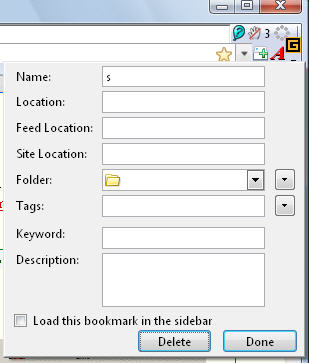
Click on a filled star item (bookmark exists)
  you get  Name:, Folder:, Tags:
         with    Delete / Done
  you should get:  Name:, URL:, Keyword:, Tags, Description:, Folder
        with     OK / Cancel
        what exactly does delete mean anyway, what if I have 5 bookmarks
          all pointing to the same url.
          and what if I change the folder of the one I'm looking at and then delete
        missing  new folder option
             and there is also the lack of changing to one of the recent folders
             both of these have been the available in version 2.
- 3.0b5, no problems solved, add more bad toolbars stuff, Back/Forward green arrows
replaced by hard to see distinguish white on blue buttons that look like scrollers.
- 3.0b5, home button now even worse it has a blue roof, window, and door, hard to distinguish. (no I do not, will not, use large buttons, which would only aggrevate the problems.)
Summary of 3.0b5 as on March 23, 2008 (#summary)
Firefox 3 problems  (3.0b5pre)

These extensions wipe out use of  shortcut Ctrl+D (Bookmark page)
   McAfee SiteAdvisor, Search Cache, Split Browser.

Toolbar icons suck,  were much better looking like Firefox than the OS.
   Back/Forward  as white scrollers in has made small icons usage humongous,
      Give us back the smaller same sized green arrow pair that fit on toolbar
      and is easier to see       without make crap look even crappier.
   The red (with white x) close button for closing tab (option to be at right of bar) is
      now practically invisible  black cross on curved metallic silver button.  Same
      for close on the  Find.
   The home icon with bluish sides and blue roof doesn't look much like a house.,
      not like the old oblique drawing.
   Tool bars look like shiny metal, makes reading wording difficult.
   Rounded corners and rounded shapes waste space on toolbars

The "Restart" within addons was okay while it lasted, now you have
   to   install, enable or disable an extension.  (Quick Restart extension is nicer)

Still have no way of working with the following in bookmarking a page
without lots of extra steps caused by  "quick bookmarks"  (star bookmarks).
   keyword shortcut,   description,  create a bookmark folder,
   can't delete a bookmark from star, if accidentally created through star
   loss of any bookmark by changing folder is probably still likely with star

Bookmarking is a mess, and without the "OpenBook"  extension to fix the
   mess, if it can undo the whole star bookmarks that would be fine, as it is practically
   impossible to work with bookmarks in Fx3 without
   a lot of extra steps, for something that purports to make bookmarking easier.

The structure of the bookmark folders has been tampered with
   Personal bookmarks separated, whole mess of new folders/bookmarks
   added to the personal bookmarks bar, and creating "unfiled bookmarks",
   "smart bookmarks" are so many definitions because it never was defined.
   It's bearable but seems like it has been designed because Firefox did not
   adopt a decent sort bookmarks that would not sort personal bookmarks
   when sorting all other bookmarks so created new folders and placements.

Minor problem:
   Clicking on Favicon has changed, and can make dragging the icon to the
   tabs bar difficult as "This site does not supply identity information"
   can cover tabs bar on a narrow window.  Modifies behavior that was
   equivalent to Ctrl+A on the location bar, but  two single clicks will work.
   Could have been done with context menu on the favicon if tools menu
   properties or page info,  is not good enough.

This one just started   use of  Ctrl+C  does not work when Firefox
   is first started until I've used it in Notepad then it works fine in Firefox.

Windows Vista Home Basic,     Minefield (non logoed Firefox 3.0b5pre)
Mozilla/5.0 (Windows; U; Windows NT 6.0; en-US; rv:1.9b5pre) Gecko/2008032304 Minefield/3.0b5pre
(#switching)
- Places, new SQLITE bookmarks, seems to be very lacking in documentation,
here are a few links: Browser.bookmarks.overwrite - MozillaZine Knowledge Base, may cause problems for those that use relocate bookmarks.html by setting browser.bookmarks.file
(bug: 381216), and more[1]. bookmarks.postplaces.html gets written to if setting is false (default).
- Places Organizer: columns do not stick from one session to another. Couple of gripees introduced at side and bottom of viewing list.
Creating a Keyword shortcut in Firefox 3
(#keyword)
Creating a keyword shortcut on Firefox 3 is a lot more complicated than
it was in Firefox 2 which had only keywords. Firefox 3 has hidden use of
keywords and folders when creating bookmarks, trying to force you into
inefficient use of tagging with tags, which makes me not very happy regardless of whether this is temporary or permanent. [Alleviated once the OpenBook extension was reworked for Places]
You can see properties list with keyword, if you right click
on bookmark in bookmarks sidebar (Ctrl+B), or with rightclick on a bookmark
entry on the right side of the "Show All Bookmarks" listings.
Bookmarks (menu) then either "Organize Bookmarks" or "Show All Bookmarks"
or anything else that item might be changed to leading to final Firefox 3.
On the bookmarks side bar select the folder you want your bookmark to appear
in, all of my keyword shortcuts are in one folder "K" in my "personal bookmarks".
Then select a bookmark within the folder, right click, choose, create bookmark, then
you will see the properties menu with keyword (the old stuff) in it, and very
curiously missing new tags entry..
        Name:       eb:   Ebay.com
        Location:   http://www.ebay.com  (you can start somewhere else, if you like)
        keyword:    eb:                  (I am suggesting it include a  colon    eb:, eb1:, eb:1)
        Description:
To use enter eb: on the location bar and hit enter.
Smart Folders (#smartfolders)
Everything is name smart this or smart that, with lots of overlap in definitions,very much abused terms, even if distinct features were identified, they are terms that just should not have been used in the first place. This is more of a repository for use in future sections or webpages. Anyway "smart bookmark folders" don't actually exist as folders, they are actually bookmarks that begin with "place:" and are database queries issued to the
bookmarks.sqlite database arranged as if a folder of bookmarks and/or history.
To recreate the 'Most Visited', 'Recently Bookmarked' or 'Recent Tags'
smart bookmarks, just create a new bookmark at the appropriate location
(e.g. the 'Smart Bookmarks' folder of the 'Bookmarks Toolbar'). Then
enter the values as indicated in a posting (2008-06-20, Roland de Ruiter).
Tagging
(#tagging)
The tagging freature added nothing to Firefox 3, because it
doesn't work, no built yet, and keyword remains broken as in
OpenBook and configuration variable.
Can't create a Bookmark, such as for a PDF file
(#nocreate)
I do not use a plug-in for PDF files, and wanted to create a bookmark
for a file http://mithras.itworld.com/download/book_chapters_and_wps/sitepoint/firefox_secrets.pdf -- so since Ctrl+D is bollixed by crippled drop-down in Places (starred bookmarks), went to bookmarks, Show All Bookmarks, selected the folder,
and tried to create the bookmark, which appeared to work, but it is not
available and does not show up in a search. I was actually going to give it
some tags, but this is the only place that you can enter a keyword and it
does not also include tags. So it appears that I cannot create a
bookmarks except through places and it appears to only allow you to bookmark
a file that is open and on the location bar. GOTCHA.
(will check later to see if this had anything to do with bug: Bug 78414 – Application shortcut keys (keyboard commands such as f11, ctrl+t, ctrl+r) fail to operate when plug-in (flash, acrobat, quicktime) has focus)
(also see may have to amend a reply or two in newsgroup).
Comparison of Bookmarks FF2 and Places FF3
(#comparison)
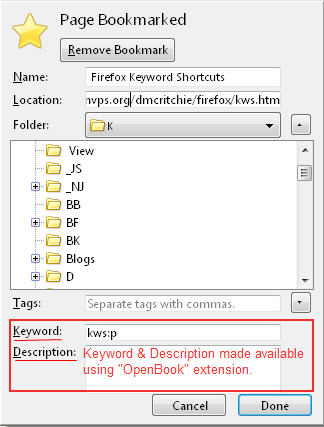
Firefox 2 usage for comparison: Bookmark Properties in Firefox 2 (for information), and a heavily annotated picture of add bookmarks dialog (with OpenBook extension) usage in Firefox 2. Even Opera has direct entry
of description and keyword (Nickname in Opera)
[picture], but Opera does not have
the substitutions (%s) that Firefox has, see Using keyword searches (KB),
and Keyword shortcuts (onsite).
compare detail pane, properties window, popup overlay and see
(info) Bug 387749 - add an item detail pane to the organizer
(info) Bug 408413 - bookmark keyword not saved when using ctrl-D add bookmark menu
(new) bug to be placed by Mike Belzer 2008-02-22
compare with the dysfunctional Places dialog in Firefox 3.0b2 (below), and a picture of what I saw twice on the right which has everything.
It would seem to be related to http://kb.mozillazine.org/Live_Bookmarks_-_Firefox#How_to_add_a_Live_Bookmark
Some pictures
of modified Firefox toolbars, and degeneration of Home, Back/Forward buttons.
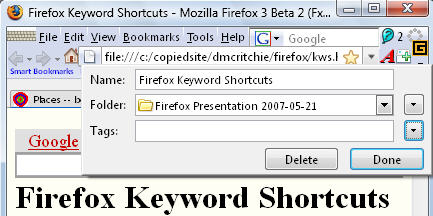
I have caught a glimpse of the dialog at the right in Firefox 3.0b2 which
includes everything I want to see when creating a bookmark, but don't
know how I got it to appear, but did capture it the second time I saw it.
| | 
|
|
with "OpenBook" extension, have access once more to the
Keyword and Description in Fx3 places using Ctrl+D, still missing
"Load this bookmark in the sidebar"
Mystery Ctrl+D giving full dialog (#mystery)
Hit ctrl+D once and got a full dialog as seen in + the tags addition
with another drop-down. Could not get it to happen again. Stupidly
switched to another page to see if it went away, and the answer is yes
so it definitely will not be working like 2.0 -- it is imperative that
the dialog stay up so you can obtain bits and pieces to add into it.
At the time it came up, I had just been using
chrome://browser/content/bookmarks/bookmarksPanel.xul
which brings up the bookmarks ("Show All Bookmarks").
produce the old bookmarks dialog
Without the OpenBook extension (#withoutopenbook)
Without the "OpenBook" extension: In order to get to Properties in Firefox 3, you have to jump
through hoops: starting with trying to locate the bookmark itself,
and be very careful in using the star within the location your are as likely
to lose your bookmark as to create or display information.
First find your bookmark is "Show all Bookmarks" (bookmarks menu),
then use the bookmarks search, once found right click to bring up
properties which does not show tags, or use the flat bookmarks editor
at the bottom of the search, and move borders around so you can see
the information.
With the "OpenBook" extension you have almost fully functional bookmark panel,
which is missing "Load in Sidepanel" option, and of course you must have the extension and it must be active in order to make reasonable use of bookmarks.
Without "OpenBook" extension: If you want to cut and paste into the places drop-down you can't because
it will disappear and you won't know if you page was bookmarked, deleted
bookmark, changed or unchanged. Very much unlike the Add Bookmark
]and properties in Firefox 2 which left a lot to be desired without
the "OpenBook" extension.
The OpenBook extension has been updated to work with Fx3, and soon afterwards
found one now can use a few userChrome.css statements and not need the extension at all.
Simply install the "Stylish" extension, then obtain
Keyword addition for Add/Change Bookmark (style 9029). So the final result is okay, but it was shear torture to having lost means available in in Version 2 in the interim (at least six months).
So even though it was posted on the internet in March, I never saw it until June.
One-click browsing in a nutshell: (in a nutcase):
Suggested User Enhancements (#user)
The following have been copied to awesomebar.htm:
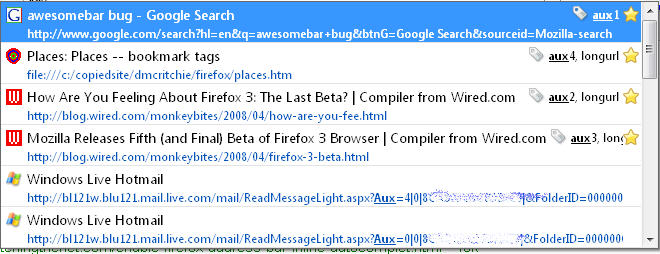
URLBAR - FIX awesomebar (URL bar autocomplete list) (#awesomebar)
Smart Location Bar documentation
in SUMO for AwesomeBar as the new autocomplete in the location bar has become known as.
Places query URIs - MDC, features introduced in Firefox 3 (probably has some browser.places.* configuration choices)
Places bookmarks begin with places: rather than http:, ftp: or file:
The awesomebar is the location drop-down that finds bookmark,
and history items that match what you've typed so far in the
location bar (url bar). In FF 3.0b2 each item is two
rows plus a separator and makes it difficult to see much on one window.
(was much better in version 2 spacewise and by appearance)
needs documentation and or updates for Fx3 |
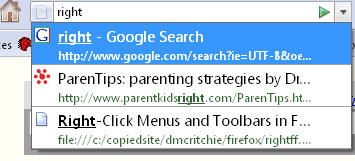
How the AwesomeBar works (that's not a misspelling in the name)
http://kb.mozillazine.org/Places.frecency.(visit_type)VisitBonus
http://kb.mozillazine.org/index.php?title=Browser.urlbar.filter.javascript
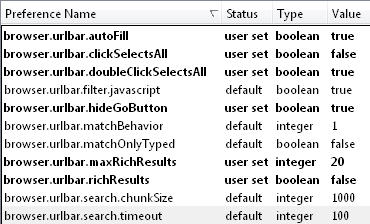
about:config preferences
browser.urlbar.maxRichResults 20 the default is 12, and 0 gets rid of
browser.urlbar.richResults False, the default is True for two lined results
browser.urlbar.matchOnlyTyped False (default) allows Autocomplete [ref.
Disabling_autocomplete]
Bug 392143 – show keywords as url bar autocomplete choices (comment #64), also provides a way of choosing which keyword bookmark you really want if you have duplicates and they go to different urls.
Look for symbols on awesome bar such as magnifying glass, key, star (bookmark)
The Places frecency algorithm - MDC, Frequency is a score given to each unique URI in Places, encompassing bookmarks, history and tags. This score is determined by the amount of revisitation, the type of those visits, how recent they were, and whether the URI was bookmarked or tagged.
The following addition for userChrome.css includes later
enhancements made in the same thread that does not interfere
with Tools, Addons list (be sure to verify that it remains
valid).
I like this one because link in FF 2 each item is on one row instead of
three, and you can hover the cursor on the url portion or the title
portion of those that ARE too long to display. You may find
enhancements later that you like better in the same thread. Included in my userChrome.css
/* FF3 URL-dropdown, Lars-Erik Østerud, 2007-12-21, revert awesomebar to Ff2,
 http://google.com/groups?threadm=b6qdnYdC8JgZiPHanZ2dnUVZ_u-unZ2d@mozilla.org
 to see tooltips may need  browser.chrome.toolbar_tips True (default) -- */
.autocomplete-richlistitem spacer,.autocomplete-richlistitem
  label{display:none!important}
.ac-title{margin:-4px 8px 2px -4px!important}
.ac-url{margin:-6px 0px 0px 20px!important}

You can test the limits by pasting this string into a Google search and then checking the location bar drop-down, the expansion is not limited to
url bar size, nor window width and will be folded at full width of the screen: (Firefox 3 changes newline characters to space for searchbar entry)
one two three four five six seven eight nine ten eleven twelve thirteen fourteen fifteen sixteen seventeen eighteen nineteen twenty twenty-one twenty-two twenty-three twenty-four twenty-five
Browser.urlbar.richResults, True: Display the drop-down of the Location Bar as a richlistbox widget. (Default), False: Use the standard drop-down widget for the Location Bar.
Mine is set to False, and I see no difference either way
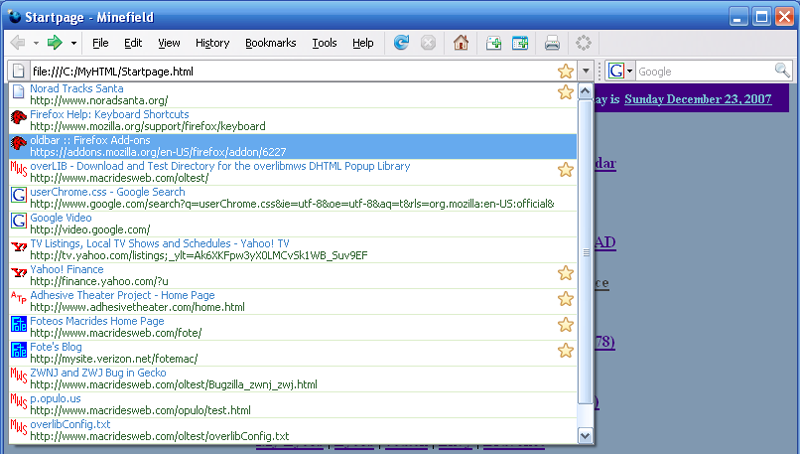
Or if you want green URL on top, and blue titles on below, space waster (Foteos Macrides, 2007-12-23) [screenshot,]
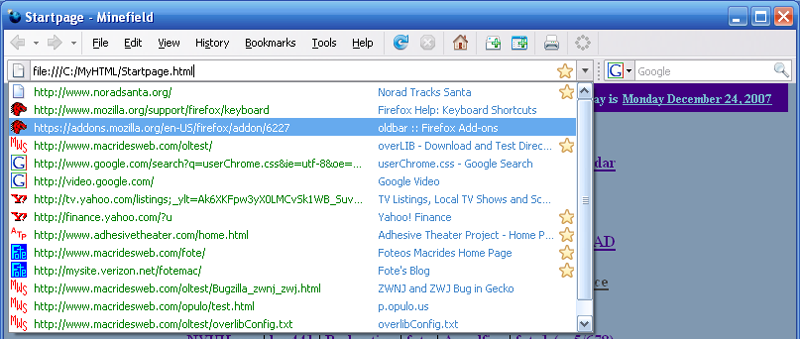
Or if you want green URL on left, and blue titles on right
(Foteos Macrides, 2007-12-24) [screenshot]
/* Compact horizontal urlbar drop-down via oldbar add-on
-- Foteos Macrides 2007-12-23*/
#PopupAutoComplete>.autocomplete-tree{color:green!important;}
.autocomplete-treebody::-moz-tree-cell-text(treecolAutoCompleteComment)
{color:#4488cc!important}
.autocomplete-treebody::-moz-tree-cell-text(selected)
{color:white!important}
treechildren.autocomplete-treebody::-moz-tree-row(selected)
{background-color:#66aaee!important}
Removing clutter from History (#lesshistory)
You can also delete history items as they appear under the location bar
with the Del key other than bookmarked. And you can do a search
on your History (Ctrl+H) for a string like "timefeed" and then
use Ctrl+A to select all such entries and delete (from history). Which
might reduce clutter of unwanted entries.
Autocomplete Links (aclinks)
- Hidden Places :: Firefox Add-ons (addons.mozilla.org), Stop URLs from specified domains being added to places and the AwesomeBar.
- Smart Location Bar, overview (support.mozilla.org)
- Places -- bookmark tags (dmcritchie)
- Search results for 'awesomebar' | userstyles.org
- Places - MDC, documentation links
- Places:Design Overview - MozillaWiki, The Places database - MDC all are for developers
- Mozilla Firefox 3 History File Format - Forensics Wiki
- How to disable Firefox 3's Smart Location Bar
- madhava.com/egotism/: Unintended awesomeness
- Quick Tips: Turn off Firefox's URL suggestions Video - Free Video Downloads - CNET TV
Autocomplete Test (#actest)
Some quick tsts
about:config for maxrich (#maxrich)
Check these out in about:config -- browser.urlbar.maxRichResults and browser.urlbar.richResults
Tracking Bug (#trackingbug)
https://bugzilla.mozilla.org/show_bug.cgi?id=409892
Bug 364745 – Extension tracking for Firefox 3
paren tips
Bug 223735 – _search does not work as a target when using window.open, so can't use
cheatsheet in sidebar.
363471 364722 373177 404122 410315 411755 411756 411757 411758 411759 411760 411762 411763 411764 411765 411766 411767 411768 411770 411774 411775 411776 411777 411779 411781 411782 411783 411784 411797 411798 411800 411801 411804 411805 411808 411809 411810 411811 411813 411814
411817 411818 411819 411820 411821 411822 411824 411829 411830 411975 411986 411998
Developer's documentation (#developers)
Just in case anyone is wondering what it takes to follow the developer's documentation mock-ups this is what I see (certainly could not do this 6 months ago, well I wouldn't have even been able to install a second version of Firefox then either, not until Sept 2007). If you really wanted to
look at a mock-up of some of places could be made to appear see 2007-12-20 the
following is what you would have to be able to do:
Looking at the
Documentation for tracking bug: 393508 – Mockup: Location Bar Autocomplete, one of the screen-shots is
http://people.mozilla.com/~faaborg/files/granParadisoUI/places_UnifyingSearch_i1.png
Bet you wished you'd had imput for bookmark tracking bug --
Bug 393509 – Mockup: Bookmark Contextual Dialog before it was too late.
A 20 inch auxiliary monitor set at 1680 x 1050 not easy to read other
stuff with, or a spanking new laptop set at 1280 x 800 sort of works but I wouldn't use either
to do anything else at those settings. So anyway they are five full size screen shots
or upper portions of such like for 1024 x 768 (I guess) with information shown to
left and right side of the screen shots -- actually the whole page is a 1/2 MB image. Glad I'm able to see that now thanks to Windows Vista and a new laptop.
SUMO Project and Replacement of HELP files (#sumo)
Advantages and Disadvantages of new Support.Mozilla.Org
I'm not really much into the advantages as far as updating and translations go, because
my interest lies in the user interface to HELP documentation, to ADDONS documentation, and Configuration
and customization documentation or the lack of same or it's destruction.
To me it is the features and customization of Firefox that really makes Firefox my browser of choice,
unfortunately it seems the direction is make Firefox take on the worst parts of other browsers and
to no longer integrate the best parts of other browsers.
Disadvantages created by SUMO project
- A very heavy web based help system replacing within application help. Heavy in
terms of large files to be uploaded, processed, stored, and a huge footprint on the screen
real estate.
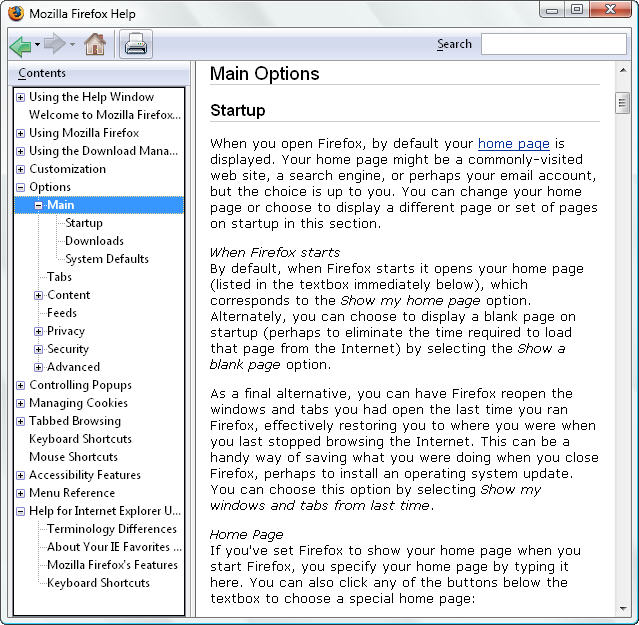
Compare these two involving HELP for menu: Tools, Options.
- Firefox 3: Options_window,
site is frequently broken, try, try and try again, use F5 several times, once there for
correct (CSS) styling.
Note there is no Table of Content on the Left, there is no continuity to other
help items, there is a huge wasteful column on the right that is wasteful in space
and very unprofessional looking (like a comic book), the unprofession large green
heading and huge TOC within the document waste two pages before you even start, and
because it is a webpage it also has to tell you that you're looking at Firefox help,
and then finally junk in the trunk at to bottom.
- Firefox 2: Fx2 Menu Options,
Have to show you a picture because there is no archive that I know of other than installing
Fx2, which will probably have it's builtin HELP destroyed as well. Note the concise TOC that
is expandable for an item into it's next levels. Note also the continuity which allows
you to read HELP as if it were a book.
- Systematic plaguarism of MozillaZine, not necessarily copyright infringement here.
You can go into the history of a MozillaZine article and really see who and when parts were
added, updated, or even removed. SUMO does not include that history of a contribution
by a large number of individuals, but purports to be newly authored.
- Replaced Help with some non-existant SUMO articles. Also affects current Fx2
online HELP file copies of HELP files, and in particular a comparison of
keyword shortcuts of Firefox, Internet Explorer, and Opera (now gone), which not only
showed that shortcuts were basically the same, but showed the differences, which is very imporatant.
- Removal of Tips and Tricks page http://support.mozilla.org/firefox/tips
- Systematic destruction of MozillaZine some of which was started before SUMO project.
Includes removal of items from about:config items into wasteful external categories. (2008-05-16 the about:config_entries is now missing).
Solution to missing problem at MozillaZine and formatting problem at SUMO was solved
from a solution by Antoine Mechelynck (Tony, 2008-05-16) by setting dom.max_chrome_script_run_time and
dom.max_script_run_time both set to 180 instead of their defaults of 20
and 10 respectively.
- Supposed to be simple documentation and not affect computer savvy people who use
newsgroups who will still have MozillaZine and configuration options, but SUMO project
has tried to divorce configuration items from Firefox as supported items, many of which
are also depended upon by addon writers. And has destroyed some items and redirected
them to ugly SUMO articles.
Testing (#testing)
- Google Street View Sightings
one person on a Mac reports having problem with Google Street View.
Click on any street view link under a picture.
- Some sites with short movie clips various formats:
Google Video,
My Space,
You Tube
[Pancakes !!!] [pancake man]
[Fish n Chips],
- Flash Movie
- Adobe Reader standalone or plug-in however you've set it up.
- Ctrl+D to bookmark a page (compare to bookmarks.htm#properties
- Ctrl+H Can't delete more than one history item at a time, nor current day,
in fact by data can hardly delete anything, bther by date and site.
- Sites that would provide abusive bookmarks, with extremely
long length descriptions, and meta keyword tags.
Unclassified material for Places bookmarks
(#unclassified)
More unclassified links (#more)
Google search: site:mozilla.org OR site:mozillazine.org about places
Probably best to skip over this section if strictly reading articles.
wiki
Configuration
Developer
- Bookmarks (onsite)
- Bookmarks Use Cases - MozillaWiki, This page is meant for describing particular behaviors you would like to see in a revamped Bookmark system. You can see how close Firefox 3 comes to what is wanted.
- Firefox 3 location bar just became almighty : Mozilla Links, misguided ergonomics justification of color usage. Not good if you don't want to look at it and color makes no difference if it is
all in the same format -- it just becomes distracting.
Keyboard shortcuts for Bookmarks
- Planned features for Firefox 3 : Mozilla Links,
Posted by Percy Cabello on January 10, 2007, and in Jan, 2008
- Firefox 3 Beta 2 review : Mozilla Links (2007-12-19, Percy Cabello)
- Firefox 3 Comments (onsite)
- Firefox 3.0 Tips & Tricks - Updated 07/02/08 - Windows BBS, transfers to Fx3 and awesomebar changes
- Does not clear browsing history, just some places links that I marked for reference, that may need to
be examined closer for MozillaZine or my firefox.htm#fx3 or here in places.htm
relating to how bookmarks.html may or may not be current between sessions with the sqlite places database.
- Places:Fx3UIPlan - MozillaWiki
- Firefox 3 for developers - MDC, If you're a developer trying to get a handle on all the new features in Firefox 3, this is the perfect place to start. This article provides a list of the new articles covering features added to Firefox 3.
The articles that I saw were certainly for developers with code snipets for extensions, not for users.
- Places query URIs - MDC, describes the parameters you can use when constructing place URIs. These URIs perform Places queries.
-
Places:Design - MDC
- Places:Design Overview - MozillaWiki, Data storage is implemented via a collection of SQLite tables:
- Places - MDC, This article covers features introduced in Firefox 3 (developer docs)
-
Places:Firefox 2 User Interface Ideas - MozillaWiki
- Sorting bookmarks alphabetically - MozillaZine Knowledge Base (personally added section on sorting bookmark separator/groupings 2008-06-25)
- Transferring data to a new profile - Firefox - MozillaZine Knowledge Base
- Unsorted Bookmarks Folder Menu :: Firefox Add-ons, Add “Unsorted Bookmarks” Folder to Bookmarks Menu. But you won't be able to
move bookmarks to "Bookmarks Menu" or "Bookmarks Toolbar" from there.
- Patch For Library 4.4 [Experimental] (9KB), Alice White. Laundry list of patches for Places in 3.0, not for Nightlies. (look at each fix
here 2008-07-06
- Bug 463027 – Private Browsing prevents the user from using anonymized and non-anonymized windows at the same time, also see if it is distinguishable such as in Nightly Tester Tools
- Smart Bookmarks folders, Starting in Firefox 3, you can create "Smart Folders" in the Places Library. These folders are like saved searches that update automatically.
- Smart Folders, place bookmarks documented in Create Your Own Smart
Bookmarks Folders in Firefox 3, place: bookmark like folders with bookmarks and/or history, sort order, max results