2007-10-04
![[1]](../icons/2007-10-04_075641.png)
![[2]](../icons/2007-10-04_075740.png)
![[3]](../icons/2007-10-04_075851.png)
![[4]](../icons/2007-10-04_075927.png)
![[5]](../icons/2007-10-04_080004.png)
![[6]](../icons/2007-10-04_080123.png)
|
Main Context Menu
2007-10-04
|
Compare your actual Firefox context menu (right-click menu) to pictures of mine.
This is spin-off from Right-Click Menus and Toolbars in Firefox
These are my customizations based on my currently enabled Firefox Extensions. Sorry having to resort to pictures for documentation, but there is no self documenting option. I think I have only changed the Menu Editor (shown at left), ant the Tools Menu (not shown). Several Firefox extension were changed within their options as whether an extension will use Edit, Tools, Context menu.If you make this window narrow you can use the mouse wheel to scroll my Menu Editor Main Context menu shown at left for a comparison to your own Menu Editor choices in a separate window. You can copy items from one menu to another, if you bring up Palette instead of another menu you can select the separation bar to copy over.
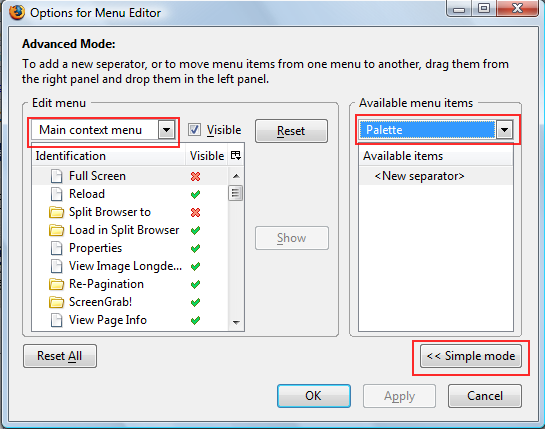
I have placed a separator above Launchy, and moved CopyURL Plus just below, and then another separator, so the pair are a tad below the middle of the context menu.
Location: http://www.mvps.org/dmcritchie/firefox/rightff_compare.htm Compare Link Context Menu
Stored image (normal link)
![[ff_rc_link_new1.jpg]](../icons/ff_rc_link_new1.jpg)
![[ff_rc_link_new2.jpg]](../icons/ff_rc_link_new2.jpg)
Right-Click on this link to compare your right-click context menu to the one I've modifed containing my chosen extensions after modifications with Menu Editor. Since these pictures, I have added “Copy Link Text” just below “Copy Link Location”.
Old links context menu 2005-11-26 (on Win2000).
New links context menu 2007-09-24 (on Vista),
last item not shown is "Unicode" and it is a folder.
Compare Text Selection Context Menu
![[bad ref to image]](../icons/ff_rc_text.png)
![[bad ref to image]](../icons/ff_rc_text_02.png)
Stored image (plain text selection) Select several words in this paragraph and then right click on and off the Selection (also Shift+F10) to compare your right-click context menu to the one I've modifed containing my chosen extensions after modifications with Menu Editor. Pretty much the same whether you click on empty area (body), single word, or a paragraph.
Compare image Context Menu
![[bad ref to image]](../icons/ff_rc_image.png)
![[bad ref to image]](../icons/ff_rc_image_02.png)
Stored image (normal link) 
Right-click on the lower right corner of the image at left (or on the purple ball .gif) to compare your own context menu to the one on the left that I've modifed containing my chosen extensions after modifications with Menu Editor. The fact that you often cannot see the entire context menu in Firefox, is the reason that I moved the "Copy Link Location" down from the other Link portions of the Context Menu.
Firefox (at least up to 1.0.7) incorrectly always places context menu up from an image, with a non-image link it will at least try down or up from the link. (Internet Explorer does not have this problem with context menu display.)
Background
ImageFor best results use full page view for comparisons, especially the next test.
Click on the picture within the link below and compare to the stored picture on the right.

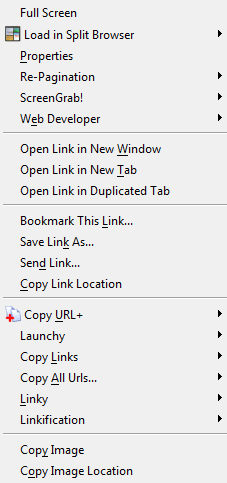
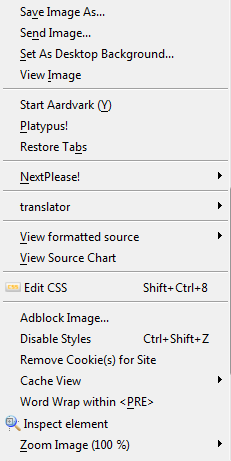
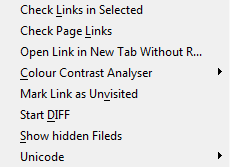
Image within a link
Images (#images)
All of the larger pictures on this page were created from print screen captures to the clipboard and then cropped and saved by SnagIt Screen Capture (TechSmith, commercial software)
Non commercial alternative screen capture programs: (Mirek), Windows program for snapping (capturing) images from selected parts of the screen, can be also used as a fast picture viewer or converter. There are also several screen capture Firefox extensions available for use in grabbing part of a webpage. Although I use and recommend SnagIt there are also free alternatives available that should work: MWSnap from Mirek's Free Windows Software, Screenshot Captor. Specifically for Firefox users there are screenshot extensions with editing and annotation tools such as Faststone Capture which did not work either but was used to produce a series of images shown at left of page.Should use PNG files if text is to be read as they are smaller and don't have the noise that JPG files have. JPEG is generally better/smaller for images but not for visible text.
Related (#related)
- Return to Right-Click on a Link within Page Content (#link) (the page you are looking at is a spin off from this link).
- Menu Editor write-up on my Firefox Customizations (notes) page, includes links to the author's page. (suggest looking at my notes first)
- Menu Editor file extension available at MozDev.
This page was introduced on November 26, 2005.[My Excel Pages -- home] [INDEX to my site and the off-site pages I reference]
[Site Search -- Excel] [Go Back] [Return to TOP]Please send your comments concerning this web page to: David McRitchie send email comments
Copyright © 2004 - 2006, F. David McRitchie, All Rights Reserved